
安装过程坑比较多,有几个方面问题:
(1)elasticSearch版本不兼容,5、6、7操作API都不一样,网上找文章各说名的。
(2)base64转码问题,用jdk不能正常使用,最后在英文网站找着elasticsearch的common包中找着解决方案。
参考此链接:
https://github.com/baidu/Elasticsearch/blob/master/src/main/elasticsearch/java/org/elasticsearch/common/Base64.java
(3)新API管道问题,采用springboot集成的elasticsearch不能有好的解决方案(可能我没有找着),最后改用
elasticsearch-rest-high-level-client,官方推荐。因此官方这方面资料比较全。
先上依赖包pom
<?xml version="1.0" encoding="UTF-8"?>
<project xmlns="http://maven.apache.org/POM/4.0.0" xmlns:xsi="http://www.w3.org/2001/XMLSchema-instance"
         xsi:schemaLocation="http://maven.apache.org/POM/4.0.0 http://maven.apache.org/xsd/maven-4.0.0.xsd">
    <modelVersion>4.0.0</modelVersion>
    <parent>
        <groupId>org.springframework.boot</groupId>
        <artifactId>spring-boot-starter-parent</artifactId>
        <version>2.2.0.RELEASE</version>
        <relativePath/>
    </parent>
    <groupId>com.zhou</groupId>
    <artifactId>essearch</artifactId>
    <version>0.0.1-SNAPSHOT</version>
    <name>essearch</name>
    <description>Demo project for Spring Boot Elasticsearch</description>

    <properties>
        <java.version>1.8</java.version>
        <fastjson.version>1.2.54</fastjson.version>
    </properties>

    <repositories>
        <repository>
            <id>nexus-aliyun</id>
            <name>Nexus aliyun</name>
            <url>http://maven.aliyun.com/nexus/content/groups/public</url>
        </repository>
    </repositories>

    <dependencies>
        <!--<dependency>
            <groupId>org.springframework.boot</groupId>
            <artifactId>spring-boot-starter-data-elasticsearch</artifactId>
        </dependency>-->

        <!--引入es -->
        <dependency>
            <groupId>org.elasticsearch</groupId>
            <artifactId>elasticsearch</artifactId>
            <version>7.6.0</version>
        </dependency>

        <dependency>
            <groupId>org.elasticsearch.client</groupId>
            <artifactId>elasticsearch-rest-client</artifactId>
            <version>7.6.0</version>
        </dependency>

        <dependency>
            <groupId>org.elasticsearch.client</groupId>
            <artifactId>elasticsearch-rest-high-level-client</artifactId>
            <version>7.6.0</version>
            <exclusions>
                <exclusion>
                    <artifactId>elasticsearch-rest-client</artifactId>
                    <groupId>org.elasticsearch.client</groupId>
                </exclusion>
            </exclusions>
        </dependency>

        <dependency>
            <groupId>org.elasticsearch.client</groupId>
            <artifactId>transport</artifactId>
            <version>7.6.0</version>
        </dependency>


        <dependency>
            <groupId>org.springframework.boot</groupId>
            <artifactId>spring-boot-starter-web</artifactId>
        </dependency>
        <dependency>
            <groupId>org.springframework.boot</groupId>
            <artifactId>spring-boot-starter-webflux</artifactId>
        </dependency>
        <dependency>
            <groupId>com.alibaba</groupId>
            <artifactId>fastjson</artifactId>
            <version>${fastjson.version}</version>
        </dependency>
        <dependency>
            <groupId>org.projectlombok</groupId>
            <artifactId>lombok</artifactId>
            <version>1.18.16</version>
            <optional>true</optional>
        </dependency>
        <dependency>
            <groupId>org.springframework.boot</groupId>
            <artifactId>spring-boot-starter-test</artifactId>
            <scope>test</scope>
        </dependency>
        <dependency>
            <groupId>io.projectreactor</groupId>
            <artifactId>reactor-test</artifactId>
            <scope>test</scope>
        </dependency>
        <dependency>
            <groupId>com.google.guava</groupId>
            <artifactId>guava</artifactId>
            <version>19.0</version>
        </dependency>

        <dependency>
            <groupId>commons-codec</groupId>
            <artifactId>commons-codec</artifactId>
            <version>1.15</version>
        </dependency>

    </dependencies>

    <build>
        <plugins>
            <plugin>
                <groupId>org.springframework.boot</groupId>
                <artifactId>spring-boot-maven-plugin</artifactId>
            </plugin>
        </plugins>
    </build>

</project>
- 安装elasticSearch7.6.0
不是最新版本,但搜索了一下关于7.x文档还是比较多,就选择了这个版本。
下载链接:
https://artifacts.elastic.co/downloads/elasticsearch/elasticsearch-7.6.0-windows-x86_64.zip
- 安装插
1)ingest-attachment   文本解析插件

        D:envelasticsearch-7.6.0in>elasticsearch-plugin install ingest-attachment

    2)elasticsearch-analysis-ik 分词插件

       D:envelasticsearch-7.6.0in>elasticsearch-plugin install https://github.com/medcl/elasticsearch-analysis-ik/releases/download/v7.6.0/elasticsearch-analysis-ik-7.6.0.zip

注:版本需要匹配- 修改配置
config/elasticsearch.yml
- 操作API参考官方网站
https://www.elastic.co/guide/en/elasticsearch/client/java-rest/7.x/java-rest-high-ingest-put-pipeline.html5. 客户端程序
请注意,SpringBoot是2.2.0.RELEASE才兼容elasticsearch 7.x
- 创建管道
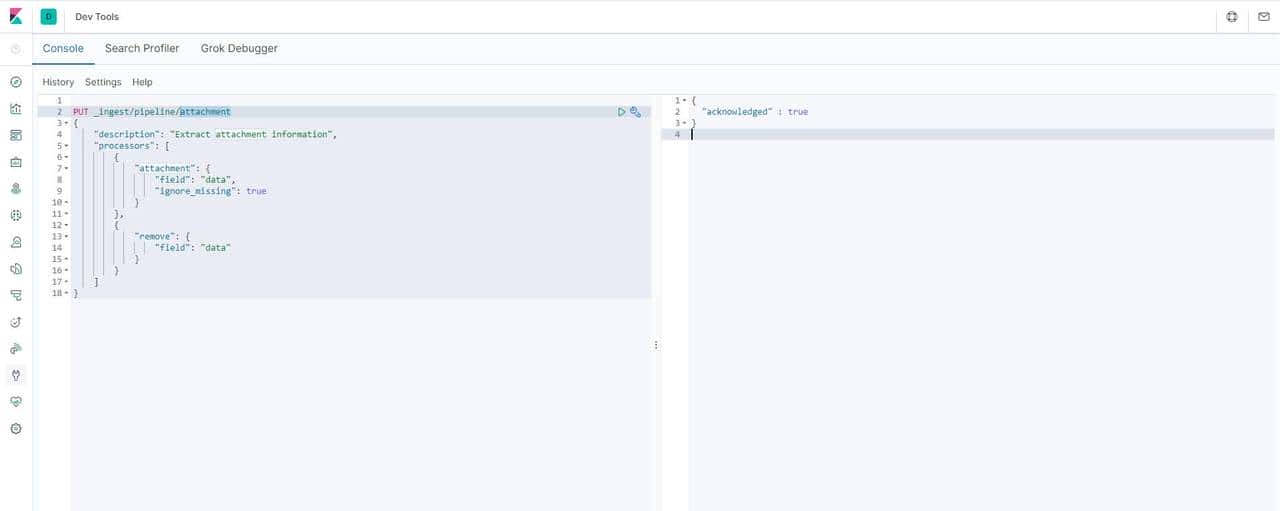
PUT _ingest/pipeline/ts_attachment
{
  "description":"政策文件管理流",
  "processors":[
    {
      "attachment":{
        "field":"data",
        "indexed_chars":-1,
        "properties":["content", "title","content_type"],
        "ignore_missing":true
      }
    },
 {
     "remove":{"field":"data"}
 }]
}
PUT book/_doc/1
{
"settings": {
"index":{
"number_of_shards":1,
"number_of_replicas":0
}
},
"mappings": {
"info":{
"properties": {
"id": {
"type": "keyword"
},
"title": {
"type": "text",
"analyzer": "ik_max_word"
},
"filename": {
"type": "text",
"analyzer": "ik_max_word"
},
"data": {
"type": "keyword",
"store": true
},
"attachment":{
"properties":{
"content":{
"type":"text",
"analyzer": "ik_max_word"
},
"content_type":{
"type":"text",
"analyzer": "ik_max_word"
},
"title":{
"type":"text",
"analyzer": "ik_max_word"
}
}
}
}
}
}
}导入数据
PUT book/info/1?pipeline=ts_attachment
{
  "id": "book001",
  "title": "这是一个测试文本",
  "filename": "测试附件",
  "data": "5paH5pys77yIVGV4dO+8ie+8jOaYr+S5pumdouivreiogOeahOihqOeOsOW9ouW8j++8m+iuoeeul+acuueahOS4gOenjeaWh+aho+exu+Wei++8m+aMh+S7u+S9leaWh+Wtl+adkOaWmeOAguaWh+acrO+8jOaYr+aMh+S5pumdouivreiogOeahOihqOeOsOW9ouW8j++8jOS7juaWh+WtpueahOinkuW6puivtO+8jOmAmuW4uOaYr+WFt+acieWujOaVtOOAgeezu+e7n+WQq+S5ie+8iE1lc3NhZ2XvvInnmoTkuIDkuKrlj6XlrZDmiJblpJrkuKrlj6XlrZDnmoTnu4TlkIjjgILkuIDkuKrmlofmnKzlj6/ku6XmmK/kuIDkuKrlj6XlrZDvvIhTZW50ZW5jZe+8ieOAgeS4gOS4quauteiQve+8iFBhcmFncmFwaO+8ieaIluiAheS4gOS4quevh+eroO+8iERpc2NvdXJzZe+8ieOAgg=="
}
PUT book/info/2?pipeline=ts_attachment
{
"id": "book002",
"title": "这是一个测试文本2",
"filename": "测试附件2",
"data": "SGFkb29w5a6e546w5LqG5LiA5Liq5YiG5biD5byP5paH5Lu257O757uf77yISGFkb29wIERpc3RyaWJ1dGVkIEZpbGUgU3lzdGVt77yJ77yM566A56ewSERGU+OAgkhERlPmnInpq5jlrrnplJnmgKfnmoTnibnngrnvvIzlubbkuJTorr7orqHnlKjmnaXpg6jnvbLlnKjkvY7lu4nnmoTvvIhsb3ctY29zdO+8ieehrOS7tuS4iu+8m+iAjOS4lOWug+aPkOS+m+mrmOWQnuWQkOmHj++8iGhpZ2ggdGhyb3VnaHB1dO+8ieadpeiuv+mXruW6lOeUqOeoi+W6j+eahOaVsOaNru+8jOmAguWQiOmCo+S6m+acieedgOi2heWkp+aVsOaNrumbhu+8iGxhcmdlIGRhdGEgc2V077yJ55qE5bqU55So56iL5bqP44CCSERGU+aUvuWuveS6hu+8iHJlbGF477yJUE9TSVjnmoTopoHmsYLvvIzlj6/ku6Xku6XmtYHnmoTlvaLlvI/orr/pl67vvIhzdHJlYW1pbmcgYWNjZXNz77yJ5paH5Lu257O757uf5Lit55qE5pWw5o2u44CC"
}查询语句
GET book/_search
{
  "query": {

    "match_all": {}
  }
}
结果
{
  "took" : 0,
  "timed_out" : false,
  "_shards" : {
    "total" : 1,
    "successful" : 1,
    "skipped" : 0,
    "failed" : 0
  },
  "hits" : {
    "total" : {
      "value" : 2,
      "relation" : "eq"
    },
    "max_score" : 1.0,
    "hits" : [
      {
        "_index" : "book",
        "_type" : "info",
        "_id" : "1",
        "_score" : 1.0,
        "_source" : {
          "filename" : "测试附件",
          "data" : "5paH5pys77yIVGV4dO+8ie+8jOaYr+S5pumdouivreiogOeahOihqOeOsOW9ouW8j++8m+iuoeeul+acuueahOS4gOenjeaWh+aho+exu+Wei++8m+aMh+S7u+S9leaWh+Wtl+adkOaWmeOAguaWh+acrO+8jOaYr+aMh+S5pumdouivreiogOeahOihqOeOsOW9ouW8j++8jOS7juaWh+WtpueahOinkuW6puivtO+8jOmAmuW4uOaYr+WFt+acieWujOaVtOOAgeezu+e7n+WQq+S5ie+8iE1lc3NhZ2XvvInnmoTkuIDkuKrlj6XlrZDmiJblpJrkuKrlj6XlrZDnmoTnu4TlkIjjgILkuIDkuKrmlofmnKzlj6/ku6XmmK/kuIDkuKrlj6XlrZDvvIhTZW50ZW5jZe+8ieOAgeS4gOS4quauteiQve+8iFBhcmFncmFwaO+8ieaIluiAheS4gOS4quevh+eroO+8iERpc2NvdXJzZe+8ieOAgg==",
          "attachment" : {
            "content_type" : "text/plain; charset=UTF-8",
            "content" : "文本(Text),是书面语言的表现形式;计算机的一种文档类型;指任何文字材料。文本,是指书面语言的表现形式,从文学的角度说,一般是具有完整、系统含义(Message)的一个句子或多个句子的组合。一个文本可以是一个句子(Sentence)、一个段落(Paragraph)或者一个篇章(Discourse)。"
          },
          "id" : "book001",
          "title" : "这是一个测试文本"
        }
      },
      {
        "_index" : "book",
        "_type" : "info",
        "_id" : "2",
        "_score" : 1.0,
        "_source" : {
          "filename" : "测试附件2",
          "data" : "SGFkb29w5a6e546w5LqG5LiA5Liq5YiG5biD5byP5paH5Lu257O757uf77yISGFkb29wIERpc3RyaWJ1dGVkIEZpbGUgU3lzdGVt77yJ77yM566A56ewSERGU+OAgkhERlPmnInpq5jlrrnplJnmgKfnmoTnibnngrnvvIzlubbkuJTorr7orqHnlKjmnaXpg6jnvbLlnKjkvY7lu4nnmoTvvIhsb3ctY29zdO+8ieehrOS7tuS4iu+8m+iAjOS4lOWug+aPkOS+m+mrmOWQnuWQkOmHj++8iGhpZ2ggdGhyb3VnaHB1dO+8ieadpeiuv+mXruW6lOeUqOeoi+W6j+eahOaVsOaNru+8jOmAguWQiOmCo+S6m+acieedgOi2heWkp+aVsOaNrumbhu+8iGxhcmdlIGRhdGEgc2V077yJ55qE5bqU55So56iL5bqP44CCSERGU+aUvuWuveS6hu+8iHJlbGF477yJUE9TSVjnmoTopoHmsYLvvIzlj6/ku6Xku6XmtYHnmoTlvaLlvI/orr/pl67vvIhzdHJlYW1pbmcgYWNjZXNz77yJ5paH5Lu257O757uf5Lit55qE5pWw5o2u44CC",
          "attachment" : {
            "content_type" : "text/plain; charset=UTF-8",
            "content" : "Hadoop实现了一个分布式文件系统(Hadoop Distributed File System),简称HDFS。HDFS有高容错性的特点,并且设计用来部署在低廉的(low-cost)硬件上;而且它提供高吞吐量(high throughput)来访问应用程序的数据,适合那些有着超大数据集(large data set)的应用程序。HDFS放宽了(relax)POSIX的要求,可以以流的形式访问(streaming access)文件系统中的数据。"
          },
          "id" : "book002",
          "title" : "这是一个测试文本2"
        }
      }
    ]
  }
}
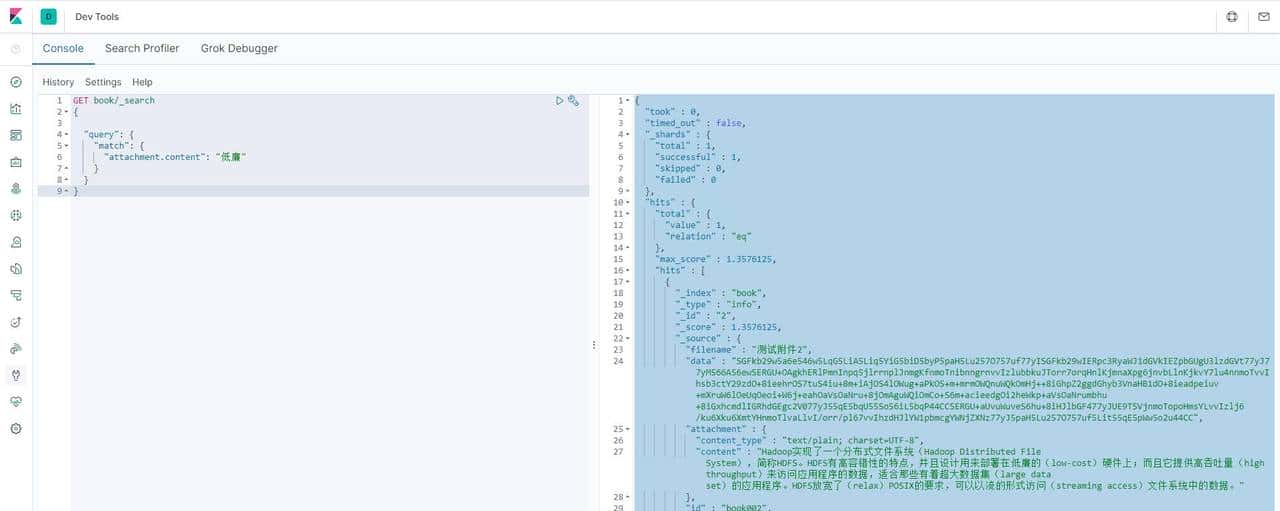
全文检索
GET book/_search
{

  "query": {
    "match": {
      "attachment.content": "低廉"
    }
  }
}
结果:
{
  "took" : 0,
  "timed_out" : false,
  "_shards" : {
    "total" : 1,
    "successful" : 1,
    "skipped" : 0,
    "failed" : 0
  },
  "hits" : {
    "total" : {
      "value" : 1,
      "relation" : "eq"
    },
    "max_score" : 1.3576125,
    "hits" : [
      {
        "_index" : "book",
        "_type" : "info",
        "_id" : "2",
        "_score" : 1.3576125,
        "_source" : {
          "filename" : "测试附件2",
          "data" : "SGFkb29w5a6e546w5LqG5LiA5Liq5YiG5biD5byP5paH5Lu257O757uf77yISGFkb29wIERpc3RyaWJ1dGVkIEZpbGUgU3lzdGVt77yJ77yM566A56ewSERGU+OAgkhERlPmnInpq5jlrrnplJnmgKfnmoTnibnngrnvvIzlubbkuJTorr7orqHnlKjmnaXpg6jnvbLlnKjkvY7lu4nnmoTvvIhsb3ctY29zdO+8ieehrOS7tuS4iu+8m+iAjOS4lOWug+aPkOS+m+mrmOWQnuWQkOmHj++8iGhpZ2ggdGhyb3VnaHB1dO+8ieadpeiuv+mXruW6lOeUqOeoi+W6j+eahOaVsOaNru+8jOmAguWQiOmCo+S6m+acieedgOi2heWkp+aVsOaNrumbhu+8iGxhcmdlIGRhdGEgc2V077yJ55qE5bqU55So56iL5bqP44CCSERGU+aUvuWuveS6hu+8iHJlbGF477yJUE9TSVjnmoTopoHmsYLvvIzlj6/ku6Xku6XmtYHnmoTlvaLlvI/orr/pl67vvIhzdHJlYW1pbmcgYWNjZXNz77yJ5paH5Lu257O757uf5Lit55qE5pWw5o2u44CC",
          "attachment" : {
            "content_type" : "text/plain; charset=UTF-8",
            "content" : "Hadoop实现了一个分布式文件系统(Hadoop Distributed File System),简称HDFS。HDFS有高容错性的特点,并且设计用来部署在低廉的(low-cost)硬件上;而且它提供高吞吐量(high throughput)来访问应用程序的数据,适合那些有着超大数据集(large data set)的应用程序。HDFS放宽了(relax)POSIX的要求,可以以流的形式访问(streaming access)文件系统中的数据。"
          },
          "id" : "book002",
          "title" : "这是一个测试文本2"
        }
      }
    ]
  }
}
javaapi 代码实现
@Override
    public void putOfficeData(String path,String title) throws Exception {

        Map<String,Object> jsonMap = new HashMap<>();
        String contentStr = Base64Util.getBase64Content(path);
        jsonMap.put("id","lijian001");
        jsonMap.put("title", title);
        jsonMap.put("filename",title);
        jsonMap.put("data", contentStr);


        IndexRequest request = new IndexRequest("book")
                .setPipeline("ts_attachment")   //这里就是前面通过json创建的管道
                .source(jsonMap);

        client.index(request, RequestOptions.DEFAULT);   //执行
    }
注:base64也是核心哦,转换很重大。
package com.zhou.essearch.utils;

import lombok.val;
import sun.misc.BASE64Decoder;
import sun.misc.BASE64Encoder;

import java.io.*;
import java.net.HttpURLConnection;
import java.net.URL;
import java.nio.charset.StandardCharsets;

/**
 * ========================
 *
 * @author bask
 * @Description: Base64 转换
 * @date : 2020/10/23 16:49
 * Version: 1.0
 * ========================
 */
public class Base64Util {

    /**
     * 获取Base64
     * @param path
     * @return
     */
    public static String getBase64Content(String path) {
        //String path = "E:\售电\同步文件夹\文档管理\阿里巴巴Java开发手册.pdf";
        byte[] message = PDFToBase64(new File(path));
        String base64Content = Base64.encodeBytes(message);
        return base64Content;
    }

    /**
     * Description: 将pdf文件转换为Base64编码
     *
     * @param file 要转的的pdf文件
     * @Author fuyuwei
     * Create Date: 2015年8月3日 下午9:52:30
     */
    public static byte[] PDFToBase64(File file) {
        BASE64Encoder encoder = new BASE64Encoder();
        FileInputStream fin = null;
        BufferedInputStream bin = null;
        ByteArrayOutputStream baos = null;
        BufferedOutputStream bout = null;
        try {
            fin = new FileInputStream(file);
            bin = new BufferedInputStream(fin);
            baos = new ByteArrayOutputStream();
            bout = new BufferedOutputStream(baos);
            byte[] buffer = new byte[1024];
            int len = bin.read(buffer);
            while (len != -1) {
                bout.write(buffer, 0, len);
                len = bin.read(buffer);
            }
            //刷新此输出流并强制写出所有缓冲的输出字节
            bout.flush();
            byte[] bytes = baos.toByteArray();
            return bytes;

        } catch (FileNotFoundException e) {
            e.printStackTrace();
        } catch (IOException e) {
            e.printStackTrace();
        } finally {
            try {
                fin.close();
                bin.close();
                bout.close();
            } catch (IOException e) {
                e.printStackTrace();
            }
        }
        return null;
    }
}
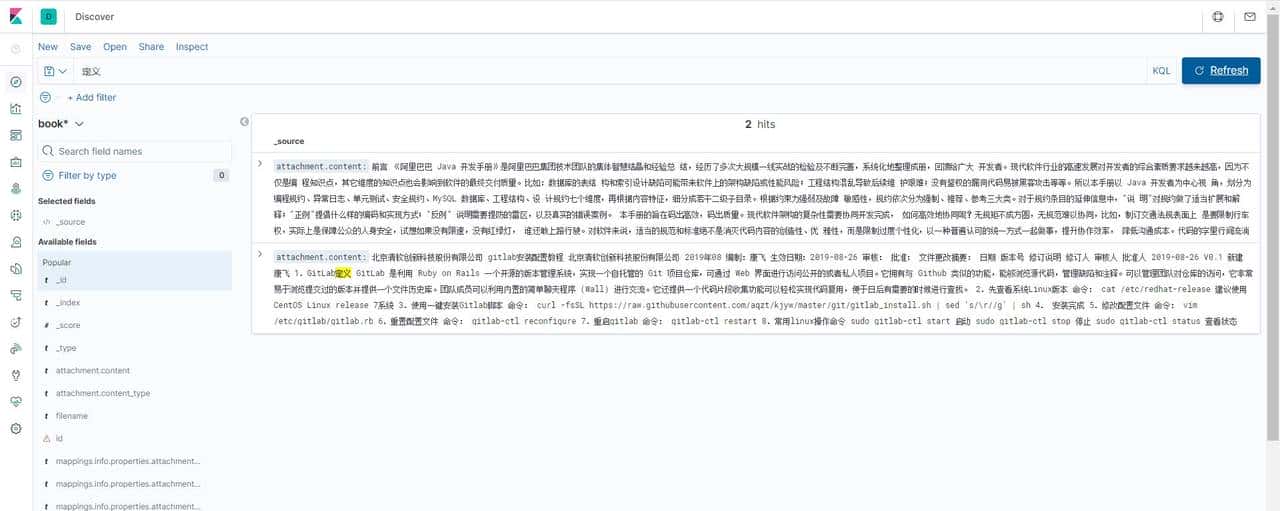
最后效果:把一个PDF和WORD文档完美放到elasticsearch中,进行全文检索。
© 版权声明
文章版权归作者所有,未经允许请勿转载。
相关文章


暂无评论...