
ai对话提示词,使用Trae开发python脚本
https://www.cnblogs.com/gccbuaa/p/19275956
https://mp.weixin.qq.com/s?__biz=MjM5ODYwMjI2MA==&mid=2649795087&idx=1&sn=2b36718af933bbf34abd8640c0662f23&scene=21&poc_token=HBFzLWmjHdi4RYrCg0xZu2y3YrYVCo9ixgGbvuMg
以往教程:
https://blog.csdn.net/m0_73690216/article/details/151257876
https://www.bilibili.com/video/BV1YtxpeVE42/?vd_source=5fe5e06a2683232f1c3e27dc8996e1a4
最新版的关键就在于它这个接口变成了post访问
本爬虫的核心思路是:模拟浏览器访问 Boss 直聘搜索页 → 监听后端返回职位数据的 API 接口 → 解析 JSON 数据提取关键字段 → 翻页循环采集 → 保存数据到 Excel
以我的安全实习查询为例子
https://www.zhipin.com/web/geek/jobs?city=100010000&query=%E5%AE%89%E5%85%A8%E5%AE%9E%E4%B9%A0
访问页面一个参数
city
query
F12利用开发者中的网络模式,刷新搜索关键词,定位到关键的api路口

https://www.zhipin.com/wapi/zpgeek/search/joblist.json?_=1764117784021
get传参了一个毫秒级时间戳
直接访问路由发现没能对应上
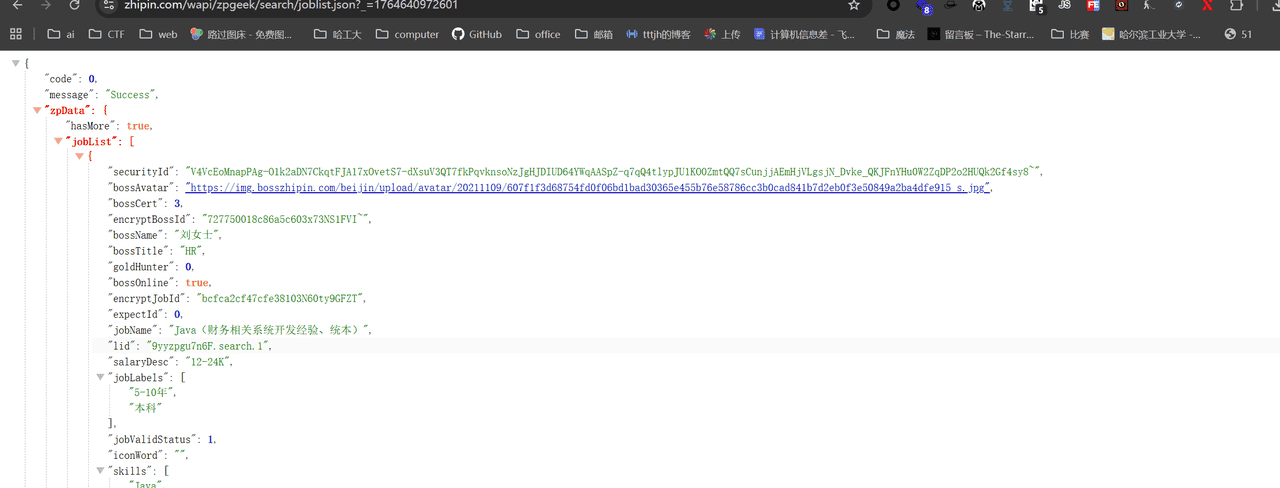
回来看发现有post传参
page=1&pageSize=15&city=100010000&expectInfo=&query=%E4%BF%A1%E6%81%AF%E5%AE%89%E5%85%A8%E5%AE%9E%E4%B9%A0&multiSubway=&multiBusinessDistrict=&position=&jobType=&salary=&experience=°ree=&industry=&scale=&stage=&scene=1
所以我们的爬虫核心流程在于,模拟浏览器访问搜索框,然后获取cookie然后构建api访问
def simulate_browser_visit(self, query="安全实习", city="100010000"):
        """
        模拟浏览器访问搜索页面,获取必要的cookies和参数

        Returns:
            bool: 模拟访问是否成功
        """
        if self.page:
            # 构建带搜索参数的URL
            search_query = query
            city_code = city
            target_url = f"https://www.zhipin.com/web/geek/jobs?city={city_code}&query={search_query}"

            # 访问搜索页面
            logger.info(f"访问URL: {target_url}")
            self.page.get(target_url)

            # 等待页面加载完成
            time.sleep(random.uniform(5, 8))

            # 模拟用户浏览行为
            logger.info("模拟用户浏览行为...")
            # 滚动页面
            self.page.scroll.down(500)
            time.sleep(random.uniform(1, 2))
            # 使用浏览器执行JavaScript获取cookies
            js_code = "return document.cookie;"
            cookies_str = self.page.run_js(js_code)
            if cookies_str:
                # 解析cookies字符串并设置
                for cookie_part in cookies_str.split(';'):
                    if '=' in cookie_part:
                        name, value = cookie_part.strip().split('=', 1)
                        self.session.cookies.set(name, value)
                logger.info("使用JavaScript方案成功设置cookies")
            return True
        return False
但是后面发现代码跑api接口仍然不是对应的的职位列表,继续查看标头
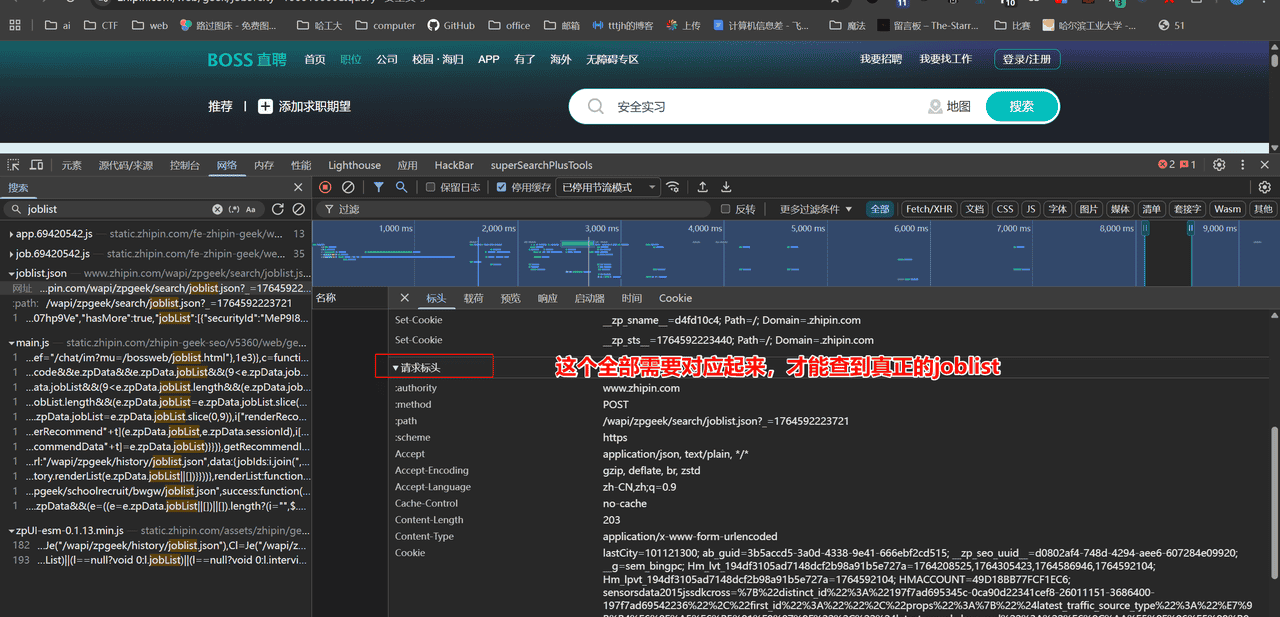
所以复制这些投喂给ai,让其修改header全部对应上,于是有了如下函数
    def update_headers_for_direct_request(self):
        """
        更新请求头用于直接API请求,使用与浏览器完全匹配的headers
        """
        # 根据真实浏览器请求更新headers
        headers = {
            'User-Agent': 'Mozilla/5.0 (Windows NT 10.0; Win64; x64) AppleWebKit/537.36 (KHTML, like Gecko) Chrome/120.0.0.0 Safari/537.36',
            'Accept': 'application/json, text/plain, */*',
            'Accept-Language': 'zh-CN,zh;q=0.9',
            'Accept-Encoding': 'gzip, deflate, br, zstd',
            'Content-Type': 'application/x-www-form-urlencoded',
            # Referer按理说应该跟查询网站是一个url,但是介于汉字编码问题,删除了发现也不影响
            #'Referer': 'https://www.zhipin.com/web/geek/jobs?city=100010000&query=%E5%AE%89%E5%85%A8%E5%AE%9E%E4%B9%A0'
            'Origin': 'https://www.zhipin.com',
            'Connection': 'keep-alive',
            'X-Requested-With': 'XMLHttpRequest',
            'sec-ch-ua': '"Chromium";v="142", "Google Chrome";v="142", "Not_A Brand";v="99"',
            'sec-ch-ua-mobile': '?0',
            'sec-ch-ua-platform': '"Windows"',
            'Sec-Fetch-Dest': 'empty',
            'Sec-Fetch-Mode': 'cors',
            'Sec-Fetch-Site': 'same-origin',
            'traceid': f'F-{random.randint(1000000, 9999999)}',  # 生成随机traceid
            'priority': 'u=1, i'
        }
        self.session.headers.update(headers)
        logger.info("更新完整API请求headers完成")
项目整体代码
import time
import json
import random
import logging
from datetime import datetime
from urllib.parse import urlencode
from DrissionPage import ChromiumPage, ChromiumOptions
import pandas as pd
import requests
from requests.adapters import HTTPAdapter
from urllib3.util.retry import Retry

# 配置日志
logging.basicConfig(
    level=logging.INFO,
    format='%(asctime)s - %(levelname)s - %(message)s',
    handlers=[
        logging.FileHandler('scraper.log'),
        logging.StreamHandler()
    ]
)
logger = logging.getLogger(__name__)

class BossZhiPinScraper:
    def __init__(self):
        # 初始化浏览器页面
        self.init_browser()
        # 初始化requests会话
        # 创建会话
        self.session = requests.Session()

        # 配置重试机制
        retry_strategy = Retry(
            total=3,
            status_forcelist=[429, 500, 502, 503, 504],
            allowed_methods=["GET", "POST"],
            backoff_factor=1  # 指数退避策略的系数
        )

        adapter = HTTPAdapter(max_retries=retry_strategy)
        self.session.mount("https://", adapter)
        self.session.mount("http://", adapter)

        # 设置初始headers
        self.session.headers.update({
            'User-Agent': 'Mozilla/5.0 (Windows NT 10.0; Win64; x64) AppleWebKit/537.36 (KHTML, like Gecko) Chrome/120.0.0.0 Safari/537.36'
        })
        logger.info("Session初始化成功,已配置重试机制")
        # 目标URL
        self.search_url = "https://www.zhipin.com/web/geek/jobs"
        self.api_url = "https://www.zhipin.com/wapi/zpgeek/search/joblist.json"
        # 存储爬取的数据
        self.all_jobs_data = []

    def init_browser(self):
        """
        初始化浏览器页面
        """
        try:
            # 创建浏览器配置
            co = ChromiumOptions()
            co.set_argument('--user-agent=Mozilla/5.0 (Windows NT 10.0; Win64; x64) AppleWebKit/537.36 (KHTML, like Gecko) Chrome/120.0.0.0 Safari/537.36')
            #co.set_argument('--headless')  # 无头模式,可注释掉查看浏览器操作

            # 创建浏览器页面
            self.page = ChromiumPage(co)
            logger.info("浏览器初始化成功")
        except Exception as e:
            logger.error(f"浏览器初始化失败: {e}")

    def simulate_browser_visit(self, query="安全实习", city="100010000"):
        """
        模拟浏览器访问搜索页面,获取必要的cookies和参数

        Returns:
            bool: 模拟访问是否成功
        """
        if self.page:
            # 构建带搜索参数的URL
            search_query = query
            city_code = city
            target_url = f"https://www.zhipin.com/web/geek/jobs?city={city_code}&query={search_query}"

            # 访问搜索页面
            logger.info(f"访问URL: {target_url}")
            self.page.get(target_url)

            # 等待页面加载完成
            time.sleep(random.uniform(5, 8))

            # 模拟用户浏览行为
            logger.info("模拟用户浏览行为...")
            # 滚动页面
            self.page.scroll.down(500)
            time.sleep(random.uniform(1, 2))
            # 使用浏览器执行JavaScript获取cookies
            js_code = "return document.cookie;"
            cookies_str = self.page.run_js(js_code)
            if cookies_str:
                # 解析cookies字符串并设置
                for cookie_part in cookies_str.split(';'):
                    if '=' in cookie_part:
                        name, value = cookie_part.strip().split('=', 1)
                        self.session.cookies.set(name, value)
                logger.info("使用JavaScript方案成功设置cookies")
            return True
        return False
    def generate_timestamp(self):
        """
        生成毫秒级时间戳,用于API请求参数
        """
        return int(time.time() * 1000)

    def update_headers_for_direct_request(self, query="安全实习", city="100010000"):
        """
        更新请求头用于直接API请求,使用与浏览器完全匹配的headers
        """
        # 根据真实浏览器请求更新headers
        headers = {
            'User-Agent': 'Mozilla/5.0 (Windows NT 10.0; Win64; x64) AppleWebKit/537.36 (KHTML, like Gecko) Chrome/120.0.0.0 Safari/537.36',
            'Accept': 'application/json, text/plain, */*',
            'Accept-Language': 'zh-CN,zh;q=0.9',
            'Accept-Encoding': 'gzip, deflate, br, zstd',
            'Content-Type': 'application/x-www-form-urlencoded',
            'Origin': 'https://www.zhipin.com',
            'Connection': 'keep-alive',
            'X-Requested-With': 'XMLHttpRequest',
            'sec-ch-ua': '"Chromium";v="142", "Google Chrome";v="142", "Not_A Brand";v="99"',
            'sec-ch-ua-mobile': '?0',
            'sec-ch-ua-platform': '"Windows"',
            'Sec-Fetch-Dest': 'empty',
            'Sec-Fetch-Mode': 'cors',
            'Sec-Fetch-Site': 'same-origin',
            'traceid': f'F-{random.randint(1000000, 9999999)}',  # 生成随机traceid
            'priority': 'u=1, i'
        }
        self.session.headers.update(headers)
        logger.info("更新完整API请求headers完成")

    def fetch_job_data(self, page=1, page_size=15, query="安全实习", city="100010000"):
        """
        发送API请求获取职位数据

        Args:
            page: 当前页码
            page_size: 每页数据量
            query: 搜索关键词
            city: 城市代码

        Returns:
            dict: 解析后的JSON数据
        """
        try:
            # 生成时间戳
            timestamp = self.generate_timestamp()

            # 构建API请求URL
            url = f"{self.api_url}?_={timestamp}"

            # 构建请求参数
            data = {
                'page': page,
                'pageSize': page_size,
                'city': city,
                'expectInfo': '',
                'query': query,
                'multiSubway': '',
                'multiBusinessDistrict': '',
                'position': '',
                'jobType': '',
                'salary': '',
                'experience': '',
                'degree': '',
                'industry': '',
                'scale': '',
                'stage': '',
                'scene': 1
            }

            # 检查是否有cookies
            if not self.session.cookies:
                logger.warning("Warning: Session中没有cookies,可能导致请求失败")
            else:
                logger.info(f"Session中包含{len(self.session.cookies)}个cookies")

            logger.info(f"请求第{page}页数据,URL: {url}")
            logger.info(f"使用POST请求,参数: page={page}, query={query}")

            # 模拟网络延迟
            time.sleep(random.uniform(1.0, 2.0))

            # 发送POST请求 - 使用form-data格式而不是json
            response = self.session.post(
                url,
                data=data,  # 使用data而不是json参数
                timeout=15
            )

            # 检查响应状态
            response.raise_for_status()
            # 尝试解析JSON
            try:
                job_data = response.json()
                # 检查数据结构
                if 'zpData' in job_data:
                    if 'jobList' in job_data['zpData']:
                        logger.info(f"成功获取第{page}页数据,找到{len(job_data['zpData']['jobList'])}个职位")
                    else:
                        logger.warning(f"第{page}页数据不包含jobList")
                else:
                    logger.warning(f"第{page}页数据不包含zpData")
                    # 打印部分响应内容用于调试
                    logger.debug(f"响应内容前200字符: {response.text[:200]}")

                return job_data
            except json.JSONDecodeError:
                # 如果不是JSON,可能是反爬页面
                logger.warning(f"响应不是有效的JSON,可能是反爬页面")
                logger.debug(f"响应内容前200字符: {response.text[:200]}")
                return None

        except requests.HTTPError as e:
            logger.error(f"HTTP错误: {e.response.status_code} - {e.response.text[:100]}")
            # 429表示请求过于频繁,等待更长时间
            if e.response.status_code == 429:
                logger.info("检测到请求过于频繁,等待10秒后重试")
                time.sleep(10)
            return None
        except Exception as e:
            logger.error(f"请求职位数据时发生错误: {e}")
            return None

    def parse_job_data(self, job_data):
        """
        解析职位数据,提取关键字段

        Args:
            job_data: 单个职位的原始数据

        Returns:
            dict: 解析后的职位信息
        """
        try:
            # 构建工作地点信息
            work_location = f"{job_data.get('cityName', '')}-{job_data.get('areaDistrict', '')}-{job_data.get('businessDistrict', '')}"

            # 提取关键字段
            parsed_job = {
                '岗位名称': job_data.get('jobName', '').strip(),
                '工作地点': work_location,
                '学历要求': job_data.get('jobDegree', '').strip(),
                '工作经验': job_data.get('jobExperience', '').strip(),
                '薪资范围': job_data.get('salaryDesc', '').strip(),
                '公司名称': job_data.get('brandName', '').strip(),
                '公司行业': job_data.get('brandIndustry', '').strip(),
                '公司规模': job_data.get('brandScaleName', '').strip(),
                '公司融资': job_data.get('brandStageName', '').strip(),
                '职位标签': ','.join(job_data.get('jobLabels', [])),
                '技能要求': ','.join(job_data.get('skills', [])),
                '招聘人姓名': job_data.get('bossName', '').strip(),
                '招聘人职位': job_data.get('bossTitle', '').strip(),
                '发布时间': datetime.now().strftime('%Y-%m-%d %H:%M:%S')
            }

            return parsed_job

        except Exception as e:
            logger.error(f"解析职位数据失败: {e}")
            return None
    def save_to_excel(self):
        """
        将爬取的数据保存到Excel文件
        """
        try:
            timestamp = datetime.now().strftime('%Y%m%d_%H%M%S')
            filename = f"boss_job_data_{timestamp}.xlsx"

            # 使用pandas创建DataFrame
            df = pd.DataFrame(self.all_jobs_data)

            # 保存到Excel
            with pd.ExcelWriter(filename, engine='openpyxl') as writer:
                df.to_excel(writer, index=False, sheet_name='职位数据')

                # 设置列宽,优化显示效果
                worksheet = writer.sheets['职位数据']
                for column in worksheet.columns:
                    max_length = 0
                    column_letter = column[0].column_letter
                    for cell in column:
                        try:
                            if cell.value:
                                max_length = max(max_length, len(str(cell.value)))
                        except:
                            pass
                    adjusted_width = min(max_length + 2, 50)
                    worksheet.column_dimensions[column_letter].width = adjusted_width

            logger.info(f"数据已保存到Excel文件: {filename}")
            print(f"
数据已保存到Excel文件: {filename}")
        except Exception as e:
            logger.error(f"保存Excel文件失败: {e}")
            print(f"
保存Excel文件失败: {e}")

    def close(self):
        """
        关闭资源
        """
        if self.page:
            try:
                self.page.quit()
                logger.info("浏览器已关闭")
            except Exception as e:
                logger.error(f"关闭浏览器时出错: {e}")

    def save_to_json(self):
        """
        将爬取的数据保存到JSON文件
        """
        try:
            timestamp = datetime.now().strftime('%Y%m%d_%H%M%S')
            filename = f"boss_job_data_{timestamp}.json"

            with open(filename, 'w', encoding='utf-8') as f:
                json.dump(self.all_jobs_data, f, ensure_ascii=False, indent=2)

            logger.info(f"数据已保存到JSON文件: {filename}")
            print(f"
数据已保存到JSON文件: {filename}")
        except Exception as e:
            logger.error(f"保存JSON文件失败: {e}")
            print(f"
保存JSON文件失败: {e}")

    def run(self):
        """
        运行爬虫主流程,支持翻页循环采集
        """
        try:
            logger.info("开始运行爬虫...")
            # 配置爬取参数
            max_pages = 2 # 最大爬取页数
            current_page = 1
            total_jobs = 0
            page_size = 15
            query = input("请输入要搜索的岗位名称(例如:安全开发):")
            print("城市代码对照表:")
            print("全国 - 100010000")
            print("北京 - 101010100")
            print("上海 - 101020100")
            print("广州 - 181280108")
            print("深圳 - 101280600")
            print("杭州 - 181210100")
            print("成都 - 101270100")
            print("武汉 - 101200100")
            print("西安 - 101110100")
            print("南京 - 101190100")
            city = input("请输入要搜索的城市代码:")
            # 模拟浏览器访问
            if not self.simulate_browser_visit(query, city):
                logger.error("无法完成浏览器模拟访问,爬虫终止")
                return

            logger.info(f"开始爬取{query}相关职位,城市代码: {city}")
            # 更新用于API请求的headers
            self.update_headers_for_direct_request(query, city)
            # 翻页循环
            while current_page <= max_pages:
                logger.info(f"正在获取第{current_page}页数据...")

                # 速率控制:随机延迟,避免被反爬
                time.sleep(random.uniform(3, 6))

                # 获取当前页数据
                data = self.fetch_job_data(
                    page=current_page,
                    page_size=page_size,
                    query=query,
                    city=city
                )

                # 检查是否成功获取数据
                if not data or 'zpData' not in data:
                    logger.warning(f"第{current_page}页数据获取失败或数据结构异常")
                    current_page += 1
                    continue

                # 检查是否有更多数据
                job_list = data['zpData'].get('jobList', [])
                if not job_list:
                    logger.info(f"第{current_page}页没有更多职位数据,爬取结束")
                    break

                logger.info(f"第{current_page}页成功获取到{len(job_list)}个职位")

                # 解析每个职位数据
                for job in job_list:
                    parsed_job = self.parse_job_data(job)
                    if parsed_job:
                        self.all_jobs_data.append(parsed_job)
                        total_jobs += 1
                        logger.info(f"解析职位[{total_jobs}]: {parsed_job['岗位名称']}")
                        print(f"职位[{total_jobs}]: {parsed_job['岗位名称']} - {parsed_job['薪资范围']}")

                current_page += 1

                # 每爬取5页后随机休息更长时间,模拟真实用户行为
                if current_page % 5 == 0:
                    rest_time = random.uniform(10, 20)
                    logger.info(f"已爬取{current_page-1}页,需要休息{rest_time:.1f}秒")
                    time.sleep(rest_time)

            logger.info(f"爬虫完成,总共获取了{total_jobs}个职位")

            # 保存数据
            if self.all_jobs_data:
                self.save_to_json()
                self.save_to_excel()
                logger.info("数据已保存到JSON和Excel文件")

        except Exception as e:
            logger.error(f"爬虫运行时出错: {e}")
        finally:
            self.close()
            logger.info("爬虫运行结束")
            print(f"
爬取完成!总共获取了{len(self.all_jobs_data)}个职位")

if __name__ == "__main__":
    scraper = BossZhiPinScraper()
    scraper.run()
© 版权声明
文章版权归作者所有,未经允许请勿转载。
相关文章




暂无评论...