
There are several reset methods for the Memor X3. A warm boot terminates an unresponsive application and clears the working RAM, but preserves both the file system and the registry. A cold boot forces all applications to close and clears working RAM and files not resident on the persistent flash memory. Registry is restored from persistent memory if available or returned to factory default. A clean boot restores the Memor X3 to factory configuration: registry and file system return to factory default.
Memor X3 有多种重置方法。热启动会终止无响应的应用程序并清除工作 RAM,但会保留文件系统和注册表。冷启动会强制关闭所有应用程序,清除工作 RAM 和非持久性闪存中的文件。如果可用,注册表会从持久性内存中恢复,或恢复为出厂默认设置。干净启动会将 Memor X3 恢复为出厂配置:注册表和文件系统恢复为出厂默认设置。
Warm Boot: A warm boot closes all applications, clears the working RAM, but preserves the file system and registry. If an application “hangs” initiate a warm boot to terminate the application. To perform a warm boot, press these keys simultaneously:
热启动:热启动会关闭所有应用程序,清除工作 RAM,但会保留文件系统和注册表。如果应用程序”卡死”,请执行热启动以终止该应用程序。执行热启动的方法是同时按下这些键:

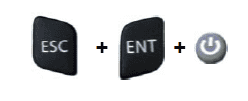
Cold Boot: A cold boot is a complete reset of the Memor X3 in which all applications are forcibly closed and RAM is completely cleared. Registry is restored from persistent memory if a saved copy is available (see 4.5.7) and RAM file system completely erased. You will lose any applications and data (registry too) which are not stored in persistent flash memory. A cold boot is necessary when the Windows CE operating system locks up and the warm boot command does not work. To perform a cold boot, press these keys simultaneously:
冷启动:冷启动是指 Memor X3 的完全重置,在此过程中所有应用程序被强制关闭,RAM 被完全清除。如果存在保存的副本,注册表将从非易失性存储器中恢复(见 4.5.7),并且 RAM 文件系统将被完全擦除。您将丢失未存储在非易失性闪存中的任何应用程序和数据(注册表也会丢失)。当 Windows CE 操作系统死锁且热启动命令无效时,需要执行冷启动。执行冷启动,请同时按下这些键:
Clean Boot: A clean boot is a cold boot that causes the device to be restored to factory configuration. The Memor X3 will reset to its factory configuration, clear the working RAM and initialize the file system. You will lose any applications and data stored in persistent flash memory. At the next startup the system will ask to recalibrate the touch screen. To perform a clean boot, follow these steps:
干净启动:干净启动是一种导致设备恢复到工厂配置的冷启动。Memor X3 将重置为其工厂配置,清除工作 RAM 并初始化文件系统。您将丢失存储在非易失性闪存中的任何应用程序和数据。下次启动时,系统将要求重新校准触摸屏。执行干净启动,请按照以下步骤操作:
1. Perform a Cold Boot (see Cold Boot).
1. 执行冷启动(见冷启动)。2. Quickly release all the keys when the screen goes black.
2. 屏幕变黑时,迅速松开所有按键。3. Within 1 second press and hold down the Esc and 0 keys until the Clean boot confirmation shows up.
3. 在 1 秒内按住 Esc 和 0 键,直到出现清洁启动确认信息。4. Release the Esc and 0 keys.
4. 松开 Esc 和 0 键。5. Enter 1 to proceed with the Clean Boot sequence. Enter 0 to cancel the Clean Boot and proceed with a Cold Boot
5. 输入 1 继续执行 Clean Boot 序列。输入 0 取消 Clean Boot 并执行 Cold Boot
Datalogic Memor x3 可以通过软复位、硬复位或出厂设置重置。软复位只需同时按下 ESC 和 Power 键。硬复位需要同时按下 ESC、ENT 和 Power 键。要执行出厂重置,需要先进行硬复位,然后当屏幕变黑时,迅速松开所有按键,在 1 秒内按下并按住 ESC 和 0 键,直到左侧橙色 LED 闪烁。接下来,按照屏幕提示输入 1 进行清洁启动,或输入 0 取消并继续执行硬复位。
软复位(暖启动热启动)
同时按下 ESC 和 Power 键。
硬复位(冷启动)
同时按下 ESC、ENT 和 Power 键。
出厂设置(清洁启动)
执行硬复位操作。屏幕变黑后,立即松开所有按键。在 1 秒内,按下并按住 ESC 和 0 键,直到左侧橙色 LED 开始闪烁。松开 ESC 和 0 键。输入 1 来继续清洁启动序列,或输入 0 来取消并执行普通的硬复位
© 版权声明
文章版权归作者所有,未经允许请勿转载。
相关文章


暂无评论...